

 EDR Home
Testimonials
EDR Features
Download
EDR
Go to EDR
Store
FAQ
Instructor's
Page
Contact Us
Finding and Interpreting an EDR Registration Level
If you purchased the EDR recently, the Key would have been emailed to you when you purchased the EDR. If you purchased the EDR some time ago, you would have purchased a “Ticket” and received the Registration Key when you registered a specific machine.
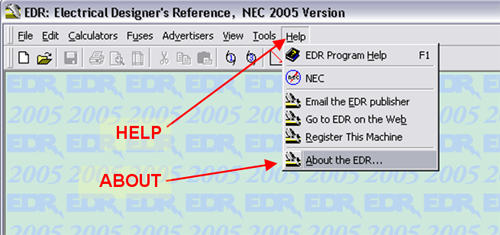
No matter how you got the Registration Key, you can see the Key by using Help-About from the EDR main menu as shown below
HELP-ABOUT location on the EDR Main Menu
This brings up the information panel, below, which shows the Registration Key. A center field of the Registration Key contains the Registration Level.
The single-digit field of the Registration Key contains the Registration Level.
If the level is 6, 7, or 8, and the date is January 2013 or newer, the key will unlock the 2008 or Current EDR.
If the level is 6, 7, or 8, and the date is before January 2013, the key will unlock the 2008 EDR, and an upgrade to the Current EDR is available.
If the level is 0 through 5, you may purchase an upgrade at a discount.
The 2nd 4-digit block is the date in MMYY format.
E23-5164-8-0208-001001-CC is a registration purchased in "0208" = Feb. 2008
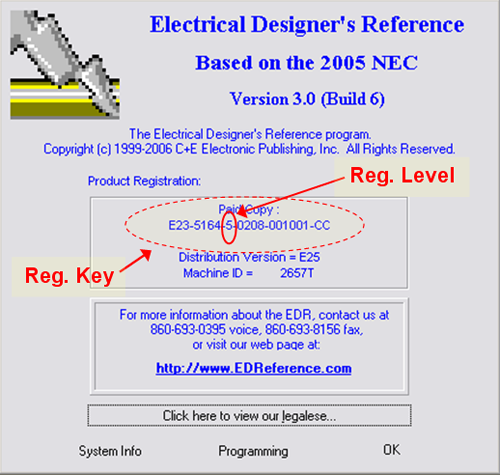
In the example graphic, the Registration Level is “5” which indicates a purchased 2005 EDR purchased in February 2008. This may be updated to the Current Version for a discount.
Very old Registration Keys have a completely a different format, like “EDR0101-198001001-CX”. These old registration keys are not eligible for discounted upgrade.
To purchase the EDR or an EDR Upgrade, please visit the EDR Store
 Go Back
Home |
Download |
Store
The Electrical Designers’ Reference is brought to you by:
C+E Electronic Publishing